The 30-Day AI Upskilling Plan for Busy Professionals

Most professionals do not have six uninterrupted months to study artificial intelligence.
You may have a full-time job, a business, family responsibilities or an active job search. You know AI is changing work, but the volume of courses, tools, videos and conflicting advice makes it difficult to decide where to begin.
So you save another tutorial. You test another application. You collect more prompts.
But after several weeks, you may still struggle to answer a simple question:
What can I now do better because I have been learning AI?
That is the problem this 30-day AI upskilling plan is designed to solve.
It will not make you an AI expert in one month. It will help you build something more immediately useful: a working understanding of AI, experience applying it to a real task, a responsible verification process and evidence you can show an employer, client or colleague.
Why your approach to AI upskilling matters
The pressure to learn is understandable.
The World Economic Forum reports that employers expect 39% of workers’ core skills to change by 2030. AI and big data are among the fastest-growing skills, but analytical thinking, creative thinking, resilience, leadership and lifelong learning remain important. The opportunity therefore lies in combining technological capability with human judgement—not choosing one over the other. World Economic Forum, Future of Jobs Report 2025
Workplace adoption and formal training are also developing at different speeds.
A UK employer survey fielded between March and June 2024 and published in January 2026 found that 31% of employers were already using AI, while only 11% had provided AI training during the preceding year. Among employers using or planning to use AI, 56% described their organisational knowledge as beginner or novice. UK Government, AI Skills for Life and Work: Employer Survey Findings
This gap creates a risk, but it also creates an opening for professionals who can demonstrate responsible, practical application.
The OECD’s July 2026 research makes an important distinction: most workers will not require advanced model-development skills. They will need sufficient AI literacy to understand, use and critically assess AI in their work. OECD, Skills in the AI Age
You do not need to learn everything. You need to learn what improves your ability to create value.
Before you begin: choose one real workplace problem
Do not start your 30-day plan by downloading five AI tools.
Start with a problem.
Choose one recurring, low-risk task that takes time, creates frustration or could be completed more effectively. For example:
- Summarising non-confidential meeting notes
- Developing first drafts of routine emails
- Turning survey comments into initial themes
- Creating presentation outlines
- Comparing publicly available market information
- Generating interview-practice questions
- Reorganising research notes
- Explaining spreadsheet formulas
- Repurposing approved content for different platforms
- Producing a first draft of a standard operating procedure
Avoid beginning with decisions involving recruitment, dismissal, health, finance, safeguarding, legal interpretation or confidential personal information. These require stronger controls and appropriate professional oversight.
Write your selected task in this format:
Over the next 30 days, I will learn to use AI responsibly to improve ____________, while measuring ____________.
Your measurement could be time saved, errors detected, number of revisions required, clarity of the final output or feedback from an appropriate reviewer.
That sentence becomes the anchor for your learning.
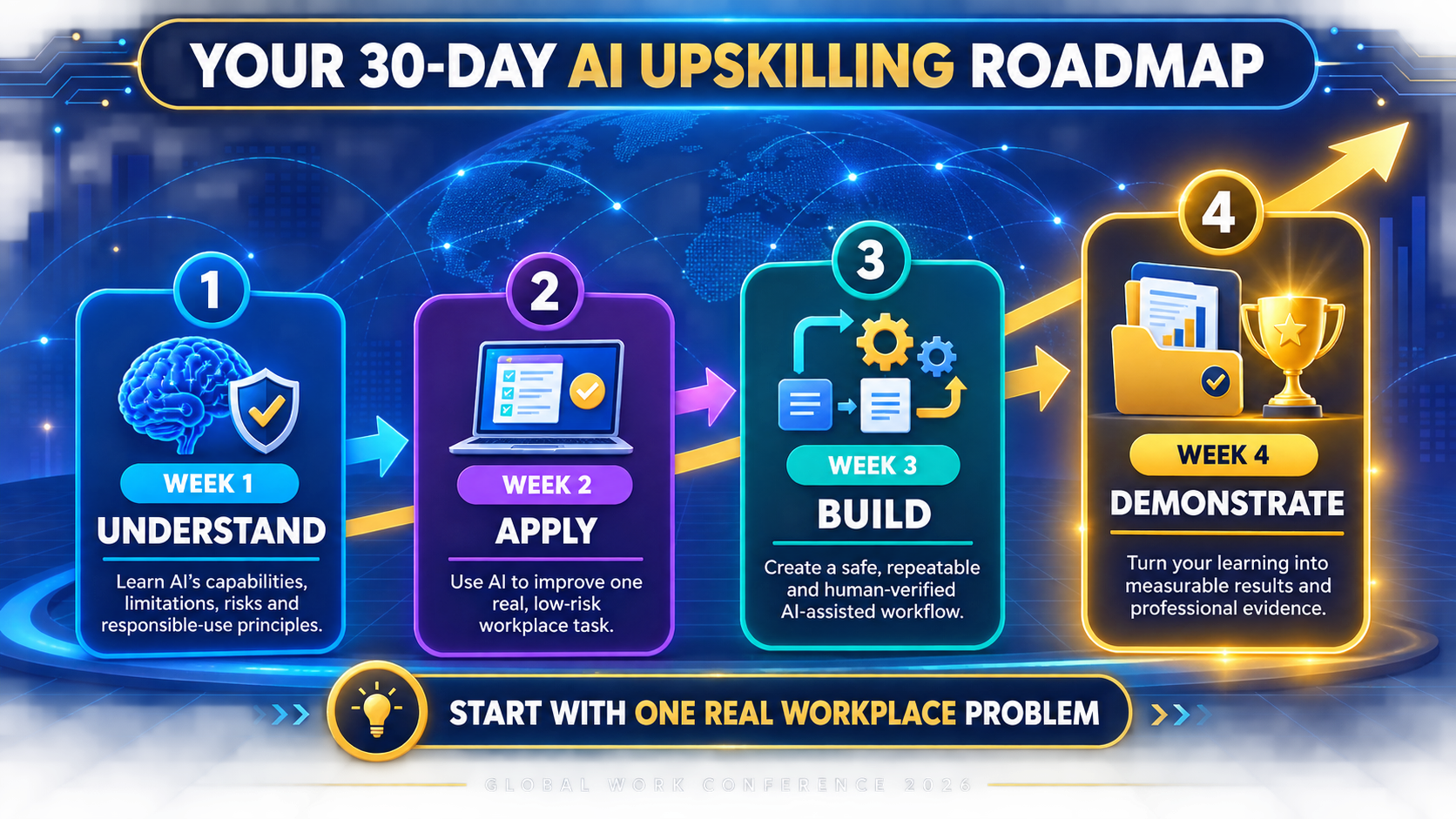
Week 1: Understand AI before depending on it
Your first week is about building foundations. The objective is not to memorise technical vocabulary. It is to understand enough to make responsible choices.
Day 1: Define your starting point
Complete a short self-assessment:
- What AI tools have I used?
- What tasks have I used them for?
- What can I do confidently?
- Where do I usually struggle?
- How do I currently verify an AI-generated answer?
- What information am I not authorised to share?
- What would meaningful improvement look like after 30 days?
Keep your answers. You will repeat the assessment on Day 30.
Day 2: Learn what generative AI actually does
Develop a simple understanding of how generative AI produces text, images or other outputs. Focus on its practical limitations:
- It can generate plausible but inaccurate information.
- Its answer can change when the instruction changes.
- It may reflect bias in data or design.
- It does not automatically understand your organisation.
- It cannot accept accountability for your decision.
The objective is not fear. It is informed use.
Day 3: Learn your organisation’s rules
Find out whether your employer has:
- An approved list of AI tools
- An acceptable-use policy
- Data-protection guidance
- Rules about confidential information
- Disclosure requirements
- Restrictions for particular tasks
- A person or team responsible for AI questions
If no policy exists, that is not permission to upload sensitive information. Use non-confidential, anonymised or fictional material for practice.
Day 4: Compare weak and strong instructions
Give an approved AI tool a broad instruction related to your chosen task. Then rewrite it to include:
- The objective
- Relevant context
- Intended audience
- Required format
- Constraints
- Quality criteria
- A direction not to invent missing information
Compare the two responses.
Notice that effective prompting is less about a collection of clever phrases and more about defining a problem clearly.
Day 5: Practise verification
Ask the tool to produce something containing facts or references. Then check every material claim against credible original sources.
Record:
- What was correct
- What was unsupported
- What was misleading
- What required additional context
- How long verification took
This exercise teaches an essential lesson: fluent writing is not proof of accuracy.
Day 6: Create your personal AI safety checklist
Write five questions you will answer before using AI:
- Is this tool approved for the task?
- Am I authorised to enter this information?
- How will I verify the output?
- Who could be affected if it is wrong?
- Who remains accountable for the result?
Keep the checklist visible during the remaining three weeks.
Day 7: Review rather than rush
Write down three lessons from the week and one behaviour you need to change.
By the end of Week 1, you should understand AI well enough to approach it with informed caution—not blind confidence or unnecessary fear.
Week 2: Apply AI to your real role
The UK Government’s July 2026 review of AI upskilling found that engagement is weaker when training is generic or disconnected from a learner’s responsibilities. It also found that task-based, well-paced training can improve confidence, while short, practical formats are particularly relevant where employees have limited time. UK Government, What Works for AI Upskilling in the UK
Your second week therefore moves from general learning to role-specific practice.
Day 8: Break your chosen task into stages
Suppose your task is preparing a monthly report. Its stages might include:
- Gathering approved information
- Identifying themes
- Creating an outline
- Drafting individual sections
- Checking claims and calculations
- Refining the language
- Securing human approval
Identify where AI could assist and where human control must remain strongest.
Day 9: Establish a baseline
Complete the task once using your normal process.
Record:
- Time required
- Number of errors or corrections
- Difficult stages
- Quality of the final result
- Feedback received, where appropriate
Without a baseline, you may feel faster without knowing whether you genuinely improved.
Day 10: Use AI for one small stage
Apply AI to only one lower-risk part of the task.
Do not attempt to automate the entire workflow. Your first objective is to observe how the tool behaves when working with a narrow, clearly defined responsibility.
Day 11: Improve the context
Revise your instruction by adding information the tool genuinely needs. This might include your audience’s level of knowledge, a preferred structure, an approved example or a list of prohibited assumptions.
Do not include sensitive information merely to make the response more personalised.
Day 12: Request alternatives
Instead of accepting the first output, ask for two or three approaches. Compare them against your quality criteria.
This keeps you in the role of decision-maker.
Day 13: Test the limits
Deliberately test an area where the tool may perform poorly. Ask it to explain uncertainty, identify missing information or critique its own response.
Self-criticism from an AI system is not independent verification, but it can help reveal questions you should investigate.
Day 14: Document what worked
Create a short record containing:
- The task
- The approved tool
- Your best instruction
- The output obtained
- Corrections required
- Risks identified
- Lessons learned
You are beginning to create evidence rather than simply claiming that you “know AI”.
Week 3: Build a repeatable AI-assisted workflow
An isolated experiment is useful. A safe and repeatable process is more valuable.
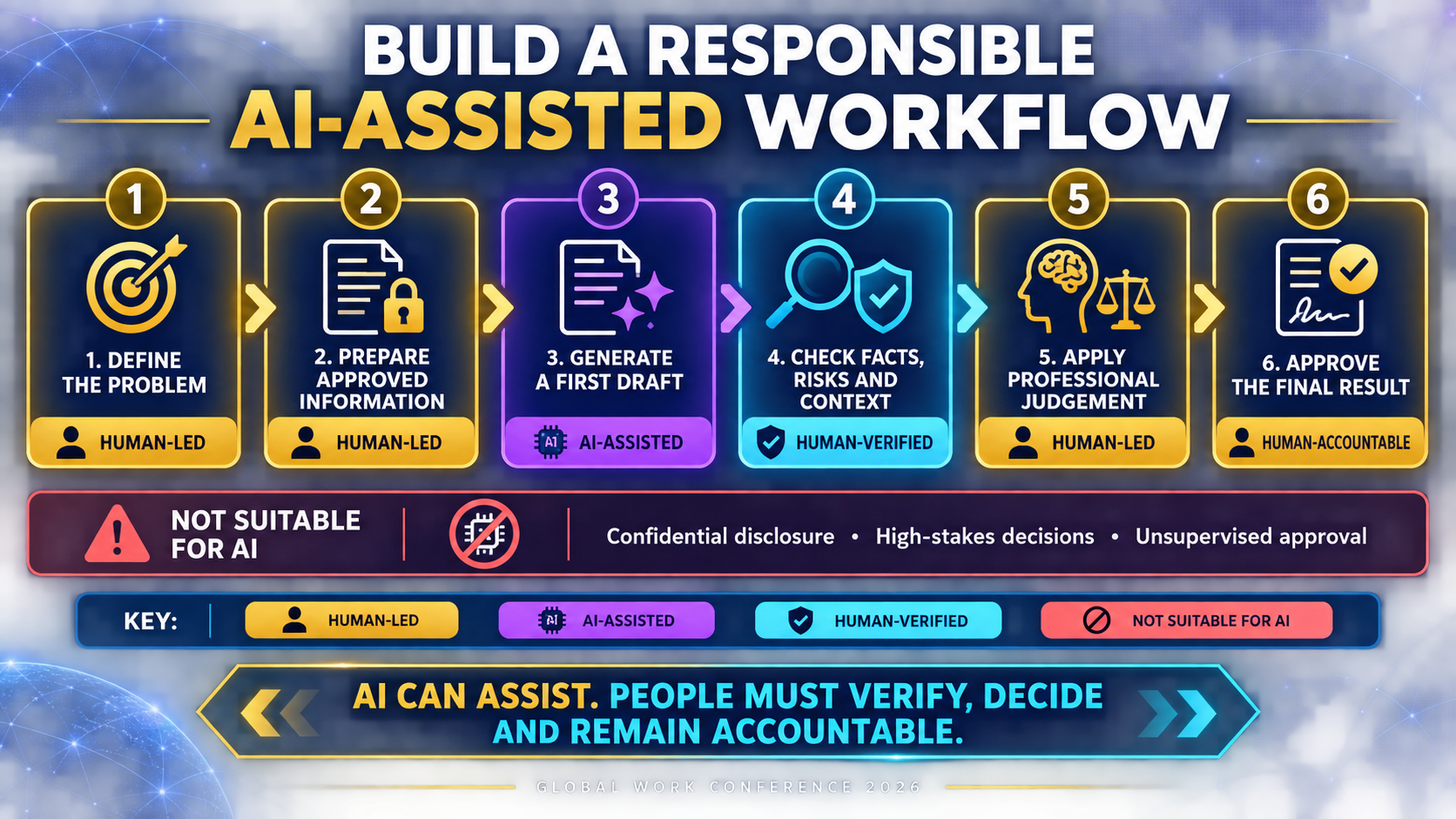
Day 15: Draw the workflow
Map the task from beginning to approval.
Mark each stage as:
- Human-led
- AI-assisted
- Human-verified
- Not suitable for AI
This prevents a common mistake: inserting AI into every stage simply because it is available.
Day 16: Create a reusable instruction template
Turn your best prompt into a template with clearly marked fields for:
- Purpose
- Audience
- Source material
- Required output
- Constraints
- Verification expectations
- Approval requirements
A reusable structure saves time while retaining the judgement needed for each new situation.
Day 17: Develop a quality rubric
Before generating the next output, define what “good” means.
Your criteria might include:
- Accurate
- Complete
- Clear
- Appropriate for the audience
- Consistent with organisational policy
- Free from unsupported claims
- Written in the correct tone
- Reviewed by an accountable person
Score the output against the rubric instead of judging it by how impressive it sounds.
Day 18: Run the complete controlled workflow
Use AI at the approved stages, complete the human checks and record the total time.
Compare the result with your Day 9 baseline.
Day 19: Examine failure points
Where did the process slow down or produce weak results?
Perhaps the source material was unclear. Perhaps your instruction contained too many tasks. Perhaps verification took longer than creating the output yourself.
A failed experiment is still useful when it prevents you from scaling a poor process.
Day 20: Improve one weakness
Change only one important part of the workflow, then test it again. This helps you understand which change produced the improvement.
Day 21: Write a one-page process guide
Document:
- When the workflow should be used
- When it should not be used
- What information is permitted
- The required steps
- The verification method
- Who approves the result
- What records should be retained
You now have a basic standard operating procedure, not merely a saved prompt.
Week 4: Turn learning into professional evidence
Certificates can support your profile, but applied evidence makes your capability easier to understand.
Your final week is about converting what you have learnt into something credible and communicable.
Day 22: Select an appropriate demonstration
Choose a version of your work that can be shared without exposing confidential or proprietary information.
You could recreate the workflow using:
- Publicly available data
- Fictional customer information
- An open report
- A self-created scenario
- An anonymised example you are authorised to use
Day 23: Capture the “before”
Show how the task was previously completed, how long it took or what problem existed.
Avoid exaggerating the weakness of the original process simply to make the improvement look impressive.
Day 24: Capture your method
Explain:
- The problem
- Why AI was appropriate
- The tool’s role
- Your own role
- How you protected information
- How you checked the output
This demonstrates judgement, not just tool familiarity.
Day 25: Capture the result
Present measurable evidence where possible:
- Minutes saved
- Fewer revision rounds
- Clearer structure
- Errors detected before submission
- Improved reviewer feedback
- Greater consistency
Do not invent an impressive percentage. A modest, verifiable improvement is more credible than an unsupported claim.
Day 26: Document the limitations
State what the tool could not do reliably and where human judgement remained essential.
This strengthens your case study because responsible professionals understand limitations.
Day 27: Create a short portfolio case study
Use this structure:
Challenge: What needed improvement?
Approach: How did you use AI?
Controls: How did you manage accuracy, privacy and bias?
Result: What changed?
Learning: What would you improve next time?
Keep it concise enough to discuss during an interview or performance review.
Day 28: Explain it to another person
Share the process with a trusted colleague, mentor or learning partner.
If you cannot explain what the AI did, what you did and how the output was checked, you do not yet understand the workflow well enough.
Day 29: Decide your next learning goal
Choose the next skill based on your role—not the loudest trend online.
Possible directions include:
- Data analysis and visualisation
- AI-assisted research
- Workflow automation
- Responsible AI governance
- Customer-service applications
- AI-supported marketing
- Productivity and knowledge management
- A technical pathway into data science or machine learning
For UK-based learners, the government-backed AI Skills Hub provides access to free foundation courses benchmarked against Skills England standards. Nigerians pursuing deeper technical pathways can also examine the official 3 Million Technical Talent programme, which includes AI, machine learning, data analysis and data science among its skills areas.
Check current eligibility and availability directly before applying.
Day 30: Repeat your self-assessment
Return to the questions from Day 1.
Then ask:
- What can I now do that I could not do confidently before?
- What evidence have I created?
- Which risks do I understand better?
- What improvement can I demonstrate?
- What will I continue practising?
- What should I stop doing?
Your most important outcome is not the number of videos watched. It is the quality of your changed behaviour.
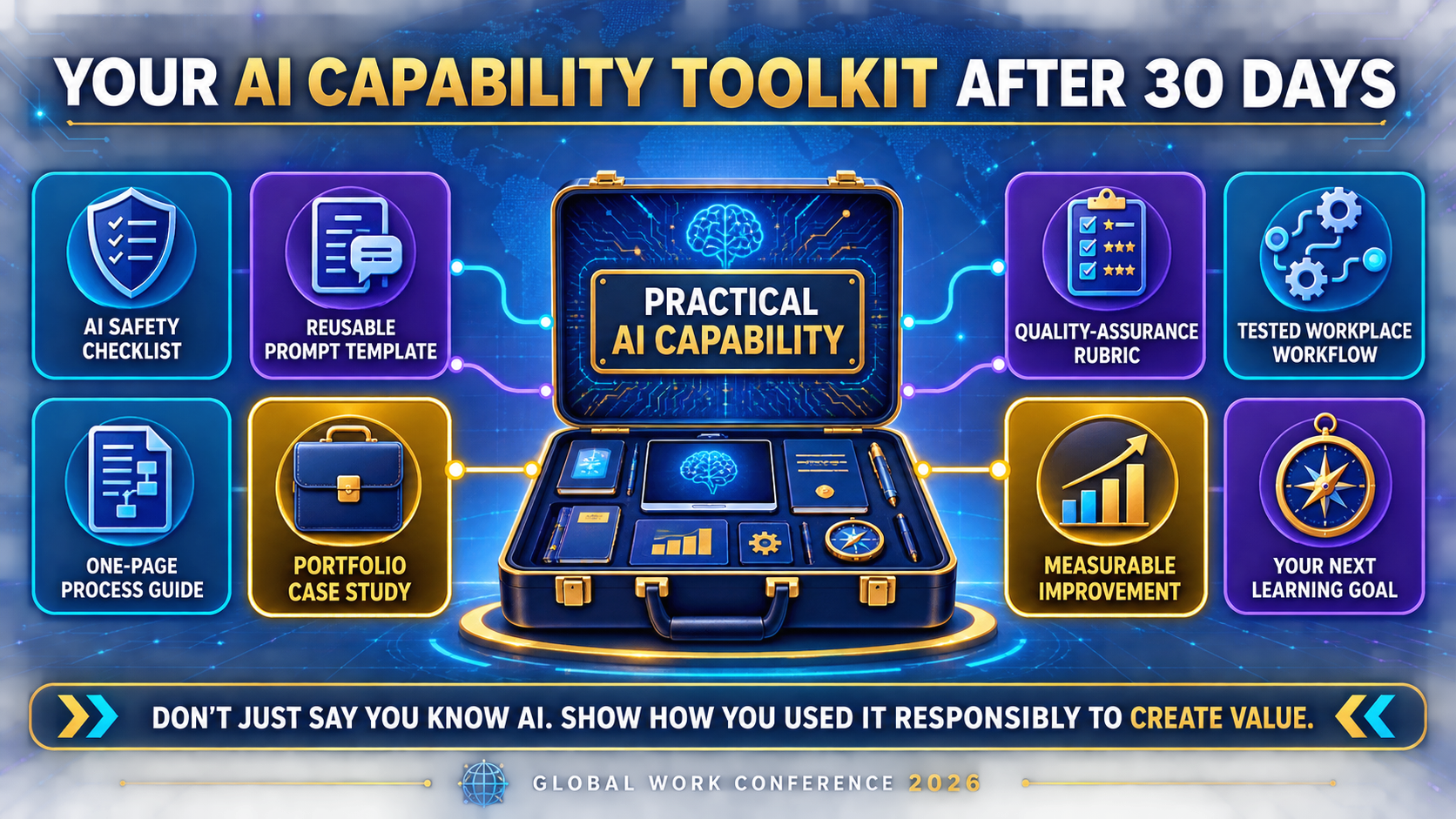
What you should have after 30 days
If you follow the plan consistently, you should finish with:
- A clearer understanding of AI’s capabilities and limitations
- A personal safety and verification checklist
- Experience applying AI to a genuine task
- A repeatable AI-assisted workflow
- A reusable instruction template
- A quality-assurance rubric
- A short process guide
- A portfolio-ready case study
- A defined next learning goal
That is far more useful than a folder filled with disconnected prompts.
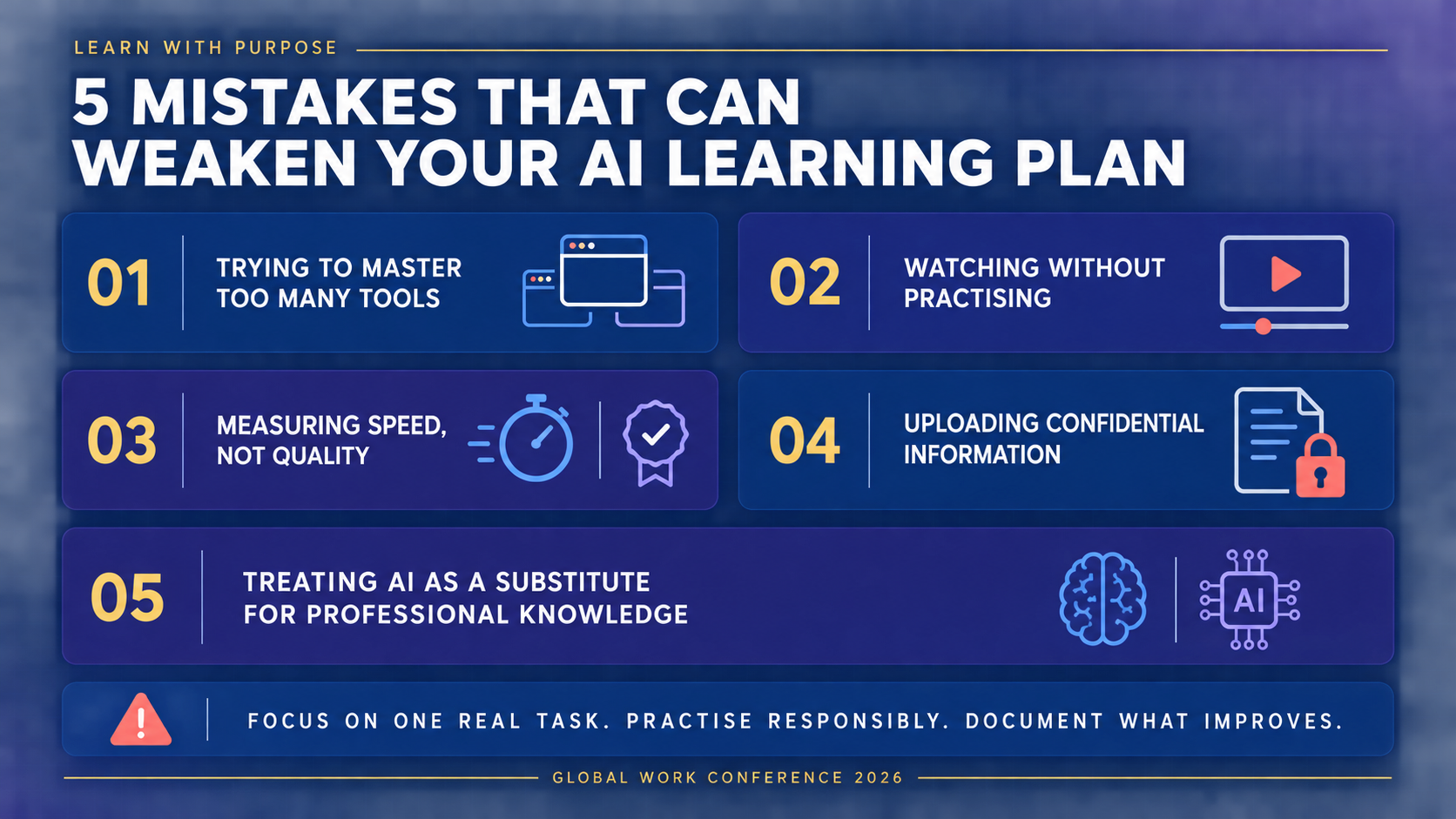
Five mistakes that can weaken your AI learning plan
1. Trying to master too many tools
Choose one approved tool and one task initially. Transferable thinking skills matter more than constantly changing platforms.
2. Watching without practising
Tutorials can introduce ideas, but application reveals what you actually understand.
3. Measuring speed while ignoring quality
Completing a task faster is not progress if the output creates more errors, risk or rework.
4. Uploading confidential information for convenience
No productivity improvement justifies unauthorised disclosure of personal or commercially sensitive information.
5. Treating AI as a substitute for professional knowledge
AI is most useful when you can recognise whether its response fits the context. Continue strengthening your sector knowledge, communication, analytical thinking and judgement.
The goal is capability – not anxiety
AI learning can easily become another source of professional pressure.
Every week brings a new tool, prediction or list of skills you are supposedly already late to learn. But unfocused urgency rarely produces meaningful capability.
A better approach is to begin with your real work, choose a manageable task, practise responsibly and document what changes.
Thirty days will not complete your AI education. It can, however, replace uncertainty with direction and passive interest with applied evidence.
That is a meaningful beginning.

The Global Work Conference 2026, themed “Unlocking Global Opportunities in the AI Economy,” is designed to continue these important conversations around AI, digital skills, careers, entrepreneurship and leadership.
Join us virtually on Saturday, 5 September 2026, from 11:00 am UK/Nigeria time.
Day 1 is free, but registration is required. Day 2, taking place on Sunday, 6 September 2026, is an optional paid masterclass.
Register for the free Day 1 conference
The professionals who thrive will not necessarily be those who chased every tool. They will be those who learnt how to use the right tools with purpose, evidence and sound judgement.
Frequently asked questions
Can I really learn useful AI skills in 30 days?
You can build a strong foundation and develop one practical workflow in 30 days. The goal is not expertise; it is responsible application, evidence of improvement and a clear direction for continued learning.
Do I need coding skills for this AI upskilling plan?
No. This plan is intended for non-technical professionals using existing AI tools. Coding may become relevant if you later pursue AI development, data science or advanced automation.
How much time should I spend each day?
Approximately 20–30 focused minutes should be enough for most activities, although testing a complete workflow or developing the case study may require longer.
Which AI tool should I use?
Use a tool approved by your employer or institution and appropriate for your task. The ability to define problems, assess outputs and manage risks is more transferable than expertise in one platform.
Can I include an AI project on my CV or LinkedIn profile?
Yes, provided you describe your contribution accurately and do not disclose confidential information. Explain the problem, your method, the controls used and the verifiable result rather than simply listing an AI tool.
Suggested internal links
- AI Literacy at Work: 8 Things Every Professional Must Know
- 7 Skills That Will Keep You Valuable in the AI Economy
- A future article on creating an AI-ready professional portfolio
- A future article on protecting confidential information when using AI
- A future guide to AI-assisted workflows for small businesses
- The GWC 2026 programme and registration page









1 Comment
The is more than a piece of writing. It is a curriculm for aspiring Ai enthuisiats. Well done